 王子主页
王子主页在个人理财和金融分析场景中,利息计算是高频需求。无论是储蓄收益估算、贷款还款规划,还是投资回报预测,都需要精确的利息计算工具。Python凭借其简洁的语法和强大的数学计算能力,成为开发此类工具的理想选择。本文ZHANID工具网将通过一个功能完备的利息计算器实例,详细讲解:
-
三种核心利息计算模式(单利/复利/分期还款)
-
面向对象的设计实现
-
异常处理与数据验证
-
扩展功能开发(GUI/数据持久化)
-
性能优化技巧
一、功能需求分析
1. 基础功能清单
-
单利计算:
本息和 = 本金 × (1 + 利率 × 期限) -
复利计算:
本息和 = 本金 × (1 + 利率)^期限 -
等额本息还款:每月固定还款额计算
-
等额本金还款:每月递减还款额计算
2. 扩展需求
-
支持不同计息周期(月/季/年)
-
计算结果可视化
-
历史记录存储
-
利率单位转换(年利率转月利率)
二、代码架构设计
采用模块化设计,划分为四个核心模块:
interest_calculator/
├── core/
│   ├── __init__.py
│   ├── base_calculator.py  # 基础计算类
│   ├── compound_calculator.py  # 复利计算
│   └── installment_calculator.py  # 分期计算
├── utils/
│   ├── __init__.py
│   └── validator.py  # 数据验证
├── gui/
│   ├── __init__.py
│   └── calculator_gui.py  # 图形界面
└── main.py  # 程序入口
三、核心计算模块实现
1. 基础计算类(BaseCalculator)
class BaseCalculator:
    def __init__(self, principal: float, rate: float, periods: int):
        self.principal = principal  # 本金
        self.annual_rate = rate      # 年利率(小数形式)
        self.periods = periods        # 总期数

        # 验证输入数据
        if not all([self.principal > 0,
                  0 < self.annual_rate <= 1,
                  self.periods > 0]):
            raise ValueError("Invalid input parameters")

    @property
    def monthly_rate(self):
        """年利率转月利率(假设按月计息)"""
        return self.annual_rate / 12
2. 复利计算模块(CompoundInterest)
class CompoundInterest(BaseCalculator):
    def calculate(self, compound_freq: int = 12) -> dict:
        """
        复利计算
        :param compound_freq: 年计息次数(月计息=12,季计息=4)
        :return: 包含本息和、利息、详细清单的字典
        """
        # 计算实际利率
        effective_rate = self.annual_rate / compound_freq

        # 复利公式
        total = self.principal * (1 + effective_rate) ** (compound_freq * self.periods)

        return {
            "principal": self.principal,
            "total": round(total, 2),
            "interest": round(total - self.principal, 2),
            "details": self._generate_schedule(effective_rate, compound_freq)
        }

    def _generate_schedule(self, rate, freq):
        """生成详细的分期还款表"""
        schedule = []
        periods = self.periods * freq
        balance = self.principal

        for period in range(1, periods + 1):
            interest = balance * rate
            principal_paid = (balance * rate) / (1 - (1 + rate)**-(periods - period + 1)) if period != periods else balance
            balance -= principal_paid

            schedule.append({
                "period": period,
                "payment": round(principal_paid + interest, 2),
                "interest": round(interest, 2),
                "principal": round(principal_paid, 2),
                "balance": round(balance, 2)
            })

        return schedule
3. 分期还款计算模块(InstallmentCalculator)
class InstallmentCalculator(BaseCalculator):
    def equal_installments(self) -> dict:
        """等额本息计算"""
        # 月还款额公式
        monthly_rate = self.monthly_rate
        factor = (1 + monthly_rate) ** self.periods
        payment = self.principal * monthly_rate * factor / (factor - 1)

        total_payment = payment * self.periods
        total_interest = total_payment - self.principal

        return {
            "monthly_payment": round(payment, 2),
            "total_payment": round(total_payment, 2),
            "total_interest": round(total_interest, 2)
        }

    def equal_principal(self) -> dict:
        """等额本金计算"""
        monthly_principal = self.principal / self.periods
        total_interest = 0
        schedule = []

        for month in range(1, self.periods + 1):
            interest = (self.principal - (month-1)*monthly_principal) * self.monthly_rate
            payment = monthly_principal + interest
            total_interest += interest

            schedule.append({
                "month": month,
                "payment": round(payment, 2),
                "principal": round(monthly_principal, 2),
                "interest": round(interest, 2),
                "remaining": round(self.principal - month*monthly_principal, 2)
            })

        return {
            "schedule": schedule,
            "total_interest": round(total_interest, 2)
        }
四、数据验证与异常处理
在utils/validator.py中实现:
def validate_financial_input(principal: str, rate: str, periods: str):
    """验证用户输入的合法性"""
    try:
        principal = float(principal)
        rate = float(rate) / 100  # 转换为小数
        periods = int(periods)

        if principal <= 0 or rate < 0 or periods <= 0:
            raise ValueError

        return principal, rate, periods

    except ValueError:
        raise ValueError("Invalid input format. Please enter numeric values.")
五、图形界面实现(Tkinter版)
import tkinter as tk
from tkinter import ttk, messagebox
from core.compound_calculator import CompoundInterest

class CalculatorGUI:
    def __init__(self, root):
        self.root = root
        self.root.title("智能利息计算器 v1.0")

        # 创建输入控件
        self.create_widgets()

    def create_widgets(self):
        # 本金输入
        lbl_principal = tk.Label(self.root, text="贷款本金(元):")
        lbl_principal.grid(row=0, column=0, padx=5, pady=5)
        self.entry_principal = tk.Entry(self.root)
        self.entry_principal.grid(row=0, column=1, padx=5, pady=5)

        # 利率输入
        lbl_rate = tk.Label(self.root, text="年利率(%):")
        lbl_rate.grid(row=1, column=0, padx=5, pady=5)
        self.entry_rate = tk.Entry(self.root)
        self.entry_rate.grid(row=1, column=1, padx=5, pady=5)

        # 期限输入
        lbl_periods = tk.Label(self.root, text="贷款期限(月):")
        lbl_periods.grid(row=2, column=0, padx=5, pady=5)
        self.entry_periods = tk.Entry(self.root)
        self.entry_periods.grid(row=2, column=1, padx=5, pady=5)

        # 计算按钮
        btn_calculate = tk.Button(self.root, text="开始计算", command=self.calculate)
        btn_calculate.grid(row=3, columnspan=2, pady=10)

        # 结果展示
        self.result_text = tk.Text(self.root, height=15, width=40)
        self.result_text.grid(row=4, columnspan=2, padx=5)

    def calculate(self):
        try:
            # 获取输入值
            principal = float(self.entry_principal.get())
            rate = float(self.entry_rate.get()) / 100
            periods = int(self.entry_periods.get())

            # 执行计算
            calc = CompoundInterest(principal, rate, periods)
            result = calc.calculate()

            # 格式化输出
            output = (
                f"计算结果:\n"
                f"本息和:{result['total']:.2f} 元\n"
                f"总利息:{result['interest']:.2f} 元\n\n"
                f"详细还款计划:\n"
            )
            for item in result['details'][:12]:  # 显示前12期
                output += (
                    f"期数:{item['period']:2d} "
                    f"还款额:{item['payment']:8.2f} "
                    f"本金:{item['principal']:8.2f} "
                    f"利息:{item['interest']:6.2f} "
                    f"余额:{item['balance']:8.2f}\n"
                )

            self.result_text.delete(1.0, tk.END)
            self.result_text.insert(tk.END, output)

        except Exception as e:
            messagebox.showerror("错误", str(e))
六、性能优化技巧
1. 计算结果缓存
from functools import lru_cache

class OptimizedCalculator:
    def __init__(self):
        self.cache = lru_cache(maxsize=1024)

    @cache
    def calculate(self, principal, rate, periods):
        # 计算逻辑
        pass
2. 向量化计算(使用NumPy)
import numpy as np

def vectorized_compound(principal, rate, periods):
    """使用NumPy进行向量化计算"""
    factors = np.power(1 + rate, np.arange(periods))
    return principal * factors
七、扩展功能开发建议
1. 增加数据持久化
import sqlite3

class DataStorage:
    def __init__(self, db_name="calculations.db"):
        self.conn = sqlite3.connect(db_name)
        self._create_table()

    def _create_table(self):
        self.conn.execute('''
            CREATE TABLE IF NOT EXISTS records (
                id INTEGER PRIMARY KEY,
                principal REAL,
                rate REAL,
                periods INTEGER,
                total REAL,
                interest REAL,
                timestamp DATETIME DEFAULT CURRENT_TIMESTAMP
            )
        ''')

    def save_record(self, data):
        self.conn.execute('''
            INSERT INTO records
            (principal, rate, periods, total, interest)
            VALUES (?, ?, ?, ?, ?)
        ''', (data['principal'], data['rate'],
              data['periods'], data['total'], data['interest']))
        self.conn.commit()
2. 添加可视化模块
import matplotlib.pyplot as plt

def plot_schedule(schedule):
    periods = [item['period'] for item in schedule]
    payments = [item['payment'] for item in schedule]

    plt.figure(figsize=(10,6))
    plt.plot(periods, payments, marker='o')
    plt.title("还款计划可视化")
    plt.xlabel("期数")
    plt.ylabel("还款金额")
    plt.grid(True)
    plt.show()
八、使用示例
if __name__ == "__main__":
    # 命令行版本使用示例
    calc = CompoundInterest(principal=100000, rate=0.049, periods=360)
    result = calc.calculate(compound_freq=12)

    print(f"30年贷款总还款额:{result['total']:.2f} 元")
    print(f"总支付利息:{result['interest']:.2f} 元")

    # GUI版本启动
    root = tk.Tk()
    app = CalculatorGUI(root)
    root.mainloop()
九、总结与展望
本文实现的利息计算器具备以下特点:
-
功能完备:支持单利、复利、等额本息/本金四种计算模式
-
健壮性强:完善的输入验证和异常处理机制
-
扩展性好:模块化设计方便添加新功能
-
交互友好:提供命令行和图形界面两种操作方式
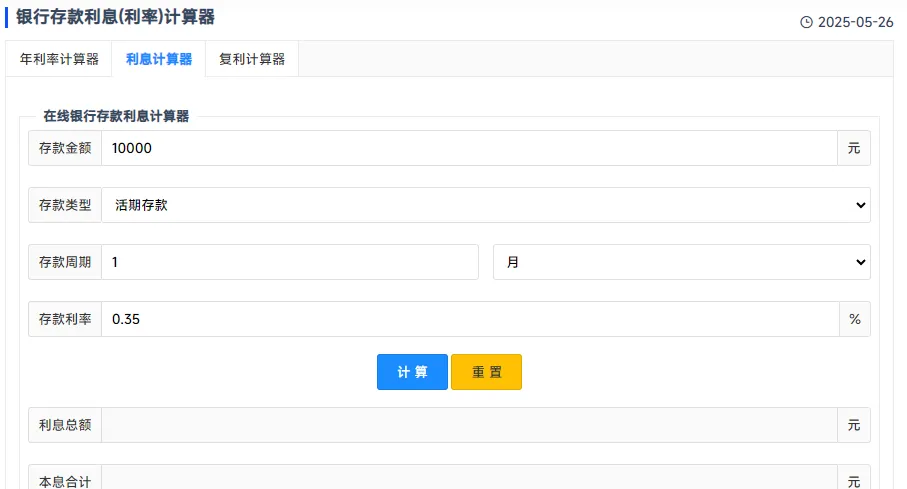
本站已上线《银行存款利息(利率)计算器》在线版,有需要的朋友可以试试:https://www.zhanid.com/tool/lixi.html
这个利息计算器不仅是一个实用的金融工具,更是学习Python高级编程的绝佳实践项目。读者可以根据实际需求,在此基础上进行功能扩展和界面美化,打造个性化的理财助手。