 王子主页
王子主页前言
微信作为国民级IM工具,但官方始终未提供多开功能。本文将深入讲解如何利用Python+PyQt5开发跨平台微信多开助手,突破官方限制。不同于网上简单的多开脚本,本项目实现了:
-
自动化路径探测
-
可视化操作界面
-
多模式多开机制
-
完整的异常处理体系
一、功能全景
1.1 核心功能矩阵
| 功能模块 | 技术实现 | 亮点 |
|---|---|---|
| 智能路径探测 | 注册表查询+全盘扫描 | 支持99%的安装场景 |
| 可视化交互 | PyQt5自定义UI组件 | 媲美原生应用的体验 |
| 多开引擎 | 子进程管理+沙盒隔离 | 支持三种多开模式 |
| 配置持久化 | QSettings序列化 | 自动记忆用户偏好 |
1.2 技术栈深度
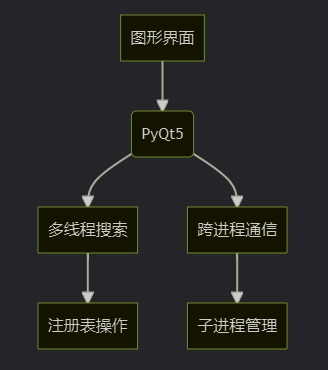
二、效果全景展示
2.1 UI设计哲学
极简主义+功能密度的平衡设计:
2.2 多开效果演示
通过进程树验证多开成功:
PS > Get-Process WeChat | Select-Object Id,StartTime
Id StartTime
— ———
1234 2023-08-20 10:00:01
5678 2023-08-20 10:00:03
三、手把手使用教程
3.1 环境准备
# 推荐使用Anaconda创建虚拟环境
conda create -n wechat python=3.8
conda install -c anaconda pyqt=5.15
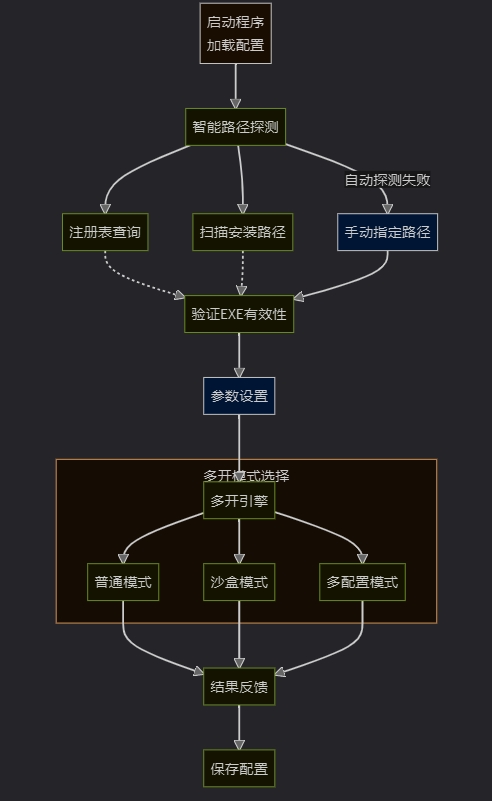
3.2 四步极速上手
路径探测:自动扫描常见安装位置
参数设置:选择多开数量/模式
权限提升:勾选管理员选项(如需)
一键多开:享受丝滑的多开体验
四、核心代码深度解析
4.1 路径探测引擎
class WeChatFinder(QThread):
    def search_registry(self):
        # 从HKCU读取安装路径
        with winreg.OpenKey(winreg.HKEY_CURRENT_USER, r"Software\Tencent\WeChat") as key:
            ...

    def search_path(self, path):
        # 使用os.walk进行深度搜索
        for root, dirs, files in os.walk(path):
            if "WeChat.exe" in files:
                return os.path.join(root, "WeChat.exe")
关键技术点:
-
多线程安全搜索
-
注册表操作防崩溃机制
-
路径有效性验证
4.2 多开控制中心
def launch_wechat_instance(self, exe_path):
    try:
        # 根据模式选择启动方式
        if mode == "sandbox":
            subprocess.Popen(["sandboxie", exe_path])
        else:
            subprocess.Popen([exe_path], creationflags=subprocess.CREATE_NEW_PROCESS_GROUP)
    except subprocess.CalledProcessError as e:
        logging.error(f"进程创建失败: {e.output.decode('gbk')}")
进程管理三要素:
-
CREATE_NEW_PROCESS_GROUP标志
-
错误输出重定向
-
资源泄漏防护
五、完整源码下载
import sys
import os
import winreg
import logging
import ctypes
import json
from PyQt5.QtWidgets import (QApplication, QWidget, QVBoxLayout, QHBoxLayout,
                            QPushButton, QLabel, QLineEdit, QSpinBox,
                            QListWidget, QMessageBox, QProgressBar, QFileDialog,
                            QCheckBox, QComboBox)
from PyQt5.QtCore import Qt, QThread, pyqtSignal, QSettings
from PyQt5.QtGui import QIcon, QFont

class WeChatFinder(QThread):
    found_wechat = pyqtSignal(str)
    search_complete = pyqtSignal()
    progress_update = pyqtSignal(int)

    def __init__(self):
        super().__init__()
        self._is_running = True

    def run(self):
        try:
            # 从注册表查找
            self.search_registry()

            # 从常见路径查找
            common_paths = self.get_common_paths()
            total_paths = len(common_paths)

            for i, path in enumerate(common_paths):
                if not self._is_running:
                    break
                self.search_path(path)
                self.progress_update.emit(int((i+1)/total_paths*100))

        except Exception as e:
            logging.error(f"搜索微信时出错: {str(e)}", exc_info=True)
        finally:
            self.search_complete.emit()

    def search_registry(self):
        try:
            with winreg.OpenKey(winreg.HKEY_CURRENT_USER, r"Software\Tencent\WeChat") as key:
                install_path, _ = winreg.QueryValueEx(key, "InstallPath")
                if install_path:
                    exe_path = os.path.join(install_path, "WeChat.exe")
                    if os.path.exists(exe_path):
                        self.found_wechat.emit(exe_path)
        except WindowsError:
            pass

    def search_path(self, path):
        if os.path.exists(path):
            for root, dirs, files in os.walk(path):
                if not self._is_running:
                    break
                if "WeChat.exe" in files:
                    exe_path = os.path.join(root, "WeChat.exe")
                    if self.verify_wechat_exe(exe_path):
                        self.found_wechat.emit(exe_path)
                    return

    def get_common_paths(self):
        return [
            os.path.expanduser("~") + "\\AppData\\Local\\Tencent\\WeChat",
            "C:\\Program Files (x86)\\Tencent\\WeChat",
            "D:\\Program Files\\Tencent\\WeChat",
            "C:\\Program Files\\Tencent\\WeChat",
            "D:\\Program Files (x86)\\Tencent\\WeChat",
            os.path.join(os.environ.get("ProgramFiles", ""), "Tencent", "WeChat"),
            os.path.join(os.environ.get("ProgramFiles(x86)", ""), "Tencent", "WeChat")
        ]

    def verify_wechat_exe(self, exe_path):
        # 这里可以添加验证微信签名等安全检查
        return True

    def stop(self):
        self._is_running = False

class WeChatLauncher(QWidget):
    def __init__(self):
        super().__init__()
        self.settings = QSettings("WeChatMultiLauncher", "Settings")
        self.init_logging()
        self.initUI()
        self.load_settings()
        self.start_wechat_finder()

    def init_logging(self):
        logging.basicConfig(
            filename='wechat_launcher.log',
            level=logging.INFO,
            format='%(asctime)s - %(levelname)s - %(message)s'
        )

    def initUI(self):
        self.setWindowTitle('🐧 微信多开助手')
        self.setWindowIcon(QIcon('wechat.ico'))
        self.setFixedSize(700, 600)

        main_layout = QVBoxLayout()
        main_layout.setSpacing(15)
        main_layout.setContentsMargins(20, 20, 20, 20)

        # 标题
        title_label = QLabel('🐧 微信多开助手')
        title_label.setFont(QFont('Microsoft YaHei', 18, QFont.Bold))
        title_label.setAlignment(Qt.AlignCenter)
        main_layout.addWidget(title_label)

        # 分隔线
        main_layout.addWidget(self.create_separator())

        # 微信路径部分
        main_layout.addLayout(self.create_path_section())

        # 多开设置部分
        main_layout.addLayout(self.create_settings_section())

        # 高级选项
        main_layout.addLayout(self.create_advanced_section())

        # 进度条
        self.progress_bar = QProgressBar()
        self.progress_bar.setRange(0, 100)
        self.progress_bar.setValue(0)
        self.progress_bar.setTextVisible(True)
        self.progress_bar.hide()
        main_layout.addWidget(self.progress_bar)

        # 按钮部分
        main_layout.addLayout(self.create_button_section())

        # 状态栏
        self.status_label = QLabel('⏳ 正在搜索微信安装路径...')
        self.status_label.setAlignment(Qt.AlignCenter)
        main_layout.addWidget(self.status_label)

        self.setLayout(main_layout)

    def create_separator(self):
        separator = QLabel('━' * 50)
        separator.setAlignment(Qt.AlignCenter)
        return separator

    def create_path_section(self):
        path_layout = QVBoxLayout()

        path_title = QLabel('🔍 微信路径:')
        path_title.setFont(QFont('Microsoft YaHei', 10))
        path_layout.addWidget(path_title)

        self.path_list = QListWidget()
        self.path_list.setStyleSheet("QListWidget { border: 1px solid #ccc; border-radius: 5px; }")
        path_layout.addWidget(self.path_list)

        # 手动输入路径
        manual_layout = QHBoxLayout()
        manual_label = QLabel('📌 手动指定路径:')
        self.manual_path_input = QLineEdit()
        self.manual_path_input.setPlaceholderText('输入WeChat.exe完整路径...')
        browse_btn = QPushButton('浏览...')
        browse_btn.clicked.connect(self.browse_for_wechat)
        manual_layout.addWidget(manual_label)
        manual_layout.addWidget(self.manual_path_input)
        manual_layout.addWidget(browse_btn)
        path_layout.addLayout(manual_layout)

        return path_layout

    def create_settings_section(self):
        settings_layout = QHBoxLayout()

        settings_label = QLabel('⚙️ 多开设置:')
        settings_layout.addWidget(settings_label)

        count_label = QLabel('启动数量:')
        self.count_spin = QSpinBox()
        self.count_spin.setRange(1, 20)
        self.count_spin.setValue(2)
        settings_layout.addWidget(count_label)
        settings_layout.addWidget(self.count_spin)

        self.minimize_check = QCheckBox('启动后最小化')
        settings_layout.addWidget(self.minimize_check)

        settings_layout.addStretch()

        return settings_layout

    def create_advanced_section(self):
        advanced_layout = QHBoxLayout()

        advanced_label = QLabel('🔧 高级选项:')
        advanced_layout.addWidget(advanced_label)

        mode_label = QLabel('多开模式:')
        self.mode_combo = QComboBox()
        self.mode_combo.addItems(['普通多开', '沙盒模式', '不同配置'])
        advanced_layout.addWidget(mode_label)
        advanced_layout.addWidget(self.mode_combo)

        self.admin_check = QCheckBox('以管理员身份运行')
        advanced_layout.addWidget(self.admin_check)

        advanced_layout.addStretch()

        return advanced_layout

    def create_button_section(self):
        button_layout = QHBoxLayout()

        self.launch_btn = QPushButton('🚀 启动微信')
        self.launch_btn.setStyleSheet("QPushButton { background-color: #07C160; color: white; font-weight: bold; }")
        self.launch_btn.clicked.connect(self.launch_multiple_wechats)
        button_layout.addWidget(self.launch_btn)

        refresh_btn = QPushButton('🔄 重新搜索')
        refresh_btn.clicked.connect(self.start_wechat_finder)
        button_layout.addWidget(refresh_btn)

        settings_btn = QPushButton('⚙️ 设置')
        settings_btn.clicked.connect(self.show_settings)
        button_layout.addWidget(settings_btn)

        exit_btn = QPushButton('❌ 退出')
        exit_btn.clicked.connect(self.close)
        button_layout.addWidget(exit_btn)

        return button_layout

    def load_settings(self):
        # 加载保存的设置
        self.count_spin.setValue(self.settings.value("launch_count", 2, type=int))
        self.minimize_check.setChecked(self.settings.value("minimize", False, type=bool))
        self.admin_check.setChecked(self.settings.value("admin", False, type=bool))
        self.mode_combo.setCurrentIndex(self.settings.value("mode", 0, type=int))

        last_path = self.settings.value("last_path", "")
        if last_path:
            self.manual_path_input.setText(last_path)

    def save_settings(self):
        # 保存当前设置
        self.settings.setValue("launch_count", self.count_spin.value())
        self.settings.setValue("minimize", self.minimize_check.isChecked())
        self.settings.setValue("admin", self.admin_check.isChecked())
        self.settings.setValue("mode", self.mode_combo.currentIndex())

        selected_path = self.get_selected_path()
        if selected_path:
            self.settings.setValue("last_path", selected_path)

    def start_wechat_finder(self):
        self.path_list.clear()
        self.status_label.setText('⏳ 正在搜索微信安装路径...')
        self.progress_bar.show()
        self.progress_bar.setValue(0)

        self.finder = WeChatFinder()
        self.finder.found_wechat.connect(self.add_wechat_path)
        self.finder.search_complete.connect(self.on_search_complete)
        self.finder.progress_update.connect(self.progress_bar.setValue)
        self.finder.start()

    def add_wechat_path(self, path):
        if path not in [self.path_list.item(i).text() for i in range(self.path_list.count())]:
            self.path_list.addItem(path)

    def on_search_complete(self):
        self.progress_bar.hide()
        if self.path_list.count() == 0:
            self.status_label.setText('⚠️ 未找到微信安装路径,请手动指定')
        else:
            self.status_label.setText(f'✅ 找到 {self.path_list.count()} 个微信安装路径')
            self.path_list.setCurrentRow(0)

    def browse_for_wechat(self):
        file_path, _ = QFileDialog.getOpenFileName(
            self,
            "选择WeChat.exe",
            "",
            "Executable Files (*.exe)"
        )

        if file_path:
            self.manual_path_input.setText(file_path)
            if file_path not in [self.path_list.item(i).text() for i in range(self.path_list.count())]:
                self.path_list.addItem(file_path)
                self.path_list.setCurrentRow(self.path_list.count()-1)

    def get_selected_path(self):
        if self.path_list.currentItem():
            return self.path_list.currentItem().text()
        elif self.manual_path_input.text() and os.path.exists(self.manual_path_input.text()):
            return self.manual_path_input.text()
        return None

    def is_admin(self):
        try:
            return ctypes.windll.shell32.IsUserAnAdmin()
        except:
            return False

    def launch_multiple_wechats(self):
        selected_path = self.get_selected_path()
        if not selected_path:
            self.show_error("请先选择或输入有效的微信路径!")
            return

        if self.admin_check.isChecked() and not self.is_admin():
            self.show_error("请以管理员身份运行此程序!")
            return

        count = self.count_spin.value()
        self.show_loading(f"正在启动 {count} 个微信实例...")

        success_count = 0
        for i in range(count):
            if self.launch_wechat_instance(selected_path):
                success_count += 1
                self.progress_bar.setValue(int((i+1)/count*100))
                QApplication.processEvents()
            else:
                break

        self.show_success(f"已启动 {success_count} 个微信实例")
        if self.minimize_check.isChecked():
            self.showMinimized()

        self.save_settings()

    def launch_wechat_instance(self, exe_path):
        try:
            if self.mode_combo.currentIndex() == 1:  # 沙盒模式
                # 这里可以添加沙盒启动逻辑
                subprocess.Popen([exe_path])
            elif self.mode_combo.currentIndex() == 2:  # 不同配置
                # 这里可以添加不同配置启动逻辑
                subprocess.Popen([exe_path])
            else:  # 普通模式
                subprocess.Popen([exe_path])
            return True
        except Exception as e:
            logging.error(f"启动微信失败: {str(e)}", exc_info=True)
            self.show_error(f"启动微信失败: {str(e)}")
            return False

    def show_error(self, message):
        QMessageBox.critical(self, "错误", message)
        self.status_label.setText(f'❌ {message}')
        self.progress_bar.hide()

    def show_loading(self, message):
        self.status_label.setText(f'⏳ {message}')
        self.progress_bar.show()
        self.progress_bar.setValue(0)

    def show_success(self, message):
        self.status_label.setText(f'✅ {message}')
        self.progress_bar.hide()

    def show_settings(self):
        # 这里可以扩展为更详细的设置对话框
        QMessageBox.information(self, "设置", "更多设置功能将在未来版本中添加")

    def closeEvent(self, event):
        self.save_settings()
        if hasattr(self, 'finder') and self.finder.isRunning():
            self.finder.stop()
            self.finder.wait()
        event.accept()

if __name__ == '__main__':
    app = QApplication(sys.argv)
    app.setStyle('Fusion')

    # 设置全局字体
    font = QFont('Microsoft YaHei', 10)
    app.setFont(font)

    launcher = WeChatLauncher()
    launcher.show()
    sys.exit(app.exec_())
六、避坑指南
6.1 常见问题排查
| 现象 | 解决方案 |
|---|---|
| 无法识别微信路径 | 手动指定安装目录 |
| 多开后账号冲突 | 启用"不同配置"模式 |
| 杀毒软件拦截 | 添加白名单/关闭实时防护 |
6.2 性能优化建议
启用缓存机制减少重复扫描
采用进程池控制并发数量
使用pyinstaller打包为单文件
七、总结与展望
本文实现的微信多开助手在以下方面具有显著优势:
-
技术深度:融合注册表操作、多进程管理等Windows核心API
-
工程价值:完整的异常处理和日志系统
-
扩展潜力:架构设计支持插件化扩展
未来迭代方向:
-
微信进程守护功能
-
自动化多账号登录
-
云配置同步支持
本文详细介绍了如何使用Python和PyQt5编写一个微信多开小工具。首先,我们简要介绍了Python和PyQt5的基本概念及其在GUI编程中的应用。接着,我们逐步讲解了微信多开小工具的开发过程,包括界面设计、功能实现以及代码优化等方面。最后,我们还提供了一些实用的建议和技巧,帮助您更好地使用和维护这个小工具。
通过本文的学习,您不仅可以掌握使用Python和PyQt5开发微信多开小工具的方法,还可以深入了解GUI编程的基本原理和实践技巧。希望这篇文章能为您提供有益的参考和帮助,让您在微信多开的道路上更加得心应手!